How to Understand Key Terms in Large Language Models
When you use AI to write, read reports, or work with files, you may encounter terms such as token, context, and agent. These terms help explain what happens when you give an AI application a task: what information it can use, how it produces a response, and whether it can take actions such as searching for sources or saving a document.
This guide introduces the main terms related to large language models (LLMs) through practical examples. It begins with how models process information, then explains how to give them instructions and reference material, how tools and agents carry out tasks, and how to organise ongoing work. It also introduces ways to access models through other software or run them on your own equipment.
1. How Language Models Work
Large Language Models
A large language model (LLM) is an AI model trained on vast amounts of text and other data to learn patterns in language. ‘Large’ refers to its scale, including the number of internal parameters adjusted during training.
When generating text, a typical LLM uses the information available to it – including your instructions and the text already written – to predict what could come next. More precisely, it predicts the next token, a small unit of text such as a word or part of a word. It selects a token, adds it to the text, and repeats the process. In this way, it builds a response step by step.
Many people first encounter LLMs through a question-and-answer conversation. But the same process also allows models to summarise documents, translate, and draft text. A fluent response, however, is not necessarily a correct one: generating plausible language does not guarantee factual accuracy.
Token
A token is a small unit of text that a language model processes. Before your message reaches the model, a tool called a tokeniser splits it into tokens. A token may be a whole word, part of a word, or a punctuation mark. Spaces can also form part of a token.
For example, a tokeniser might keep ‘cat’ as one token but split ‘playing’ into ‘play’ and ‘ing’. This is an illustration, not a fixed rule: different tokenisers can split the same text differently. A token is therefore not the same thing as a word, and counting words will not give you an exact token count.
Each token is assigned a numerical ID so that the model can process the text as numbers. When generating a reply, the model predicts tokens one at a time. These tokens are then converted back into the text you see on screen.
Token counts matter when using a model. Input tokens are the tokens in the material supplied to it, such as your instructions, documents, and any earlier messages included in the conversation. Output tokens are the tokens it generates. Many model providers charge for API use based on these counts, often at different rates for input and output. Models also have limits on how many tokens they can process or generate in one request.
Longer texts generally require more tokens. The language also makes a difference: expressing the same meaning in different languages can produce different token counts. To find the exact count for a piece of text, you need the tokeniser used by that model.
Pre-trained Knowledge
Token prediction explains how a model produces text, but it does not yet explain why a model can answer questions without being given any external files. The answer lies in what it learnt during training. During training, a large language model learns patterns and information from massive amounts of text, code, and other data.
This is also why, even if we do not provide the model with any external files, it can still answer a large number of questions about common sense, history, maths, programming, and so on. This content is not obtained by the model through temporary searching. The model has already learnt patterns related to this information during training. This information is often described as the model’s pre-trained knowledge.
However, the model does not have a perfect database of facts. It learns patterns from its training data, and these patterns can sometimes be incomplete, outdated, biased, or simply wrong. When the model does not have enough reliable information to answer a question, it may still try to produce an answer based on what it has learnt. This is one reason hallucinations can happen.
Multimodality
Pre-trained knowledge is still mainly about patterns learnt from text and other training data. But is there a model that can accept different types of input beyond natural language, or generate content other than ordinary text, such as images, audio, and video? The answer is yes. Such models are called multimodal models.
Imagine uploading a photograph of a flower and asking, ‘What kind of flower is this?’ The system prepares two kinds of input. Your question is split into tokens and converted into numerical IDs, as described above. The photograph is processed separately into a numerical form that allows the model to work with visual details such as colours, shapes, and the arrangement of petals.
The model then uses both the visual information from the photograph and the question you have asked to generate a reply. This ability to combine different types of information is a key feature of multimodal models. Models that support audio or video also convert those inputs into numerical forms they can process, although the methods vary between models.
Of course, this does not mean that models supporting only natural language have no external channels at all for understanding images. A common approach is to use image text recognition or audio transcription tools to convert different types of data into general text, which is then input into the model.
To some extent, however, this approach involves loss. Imagine that, for a human being, reading a textual description of an image is still inferior to viewing the image directly. So multimodal models are generally better at working directly with these different types of information.
2. Giving Models Instructions and Information
Prompt
Understanding how a model works internally is useful, but in daily use, the first thing that matters is how we communicate with it. To make a large language model give a high-quality answer, how you express the task to the model matters greatly, in addition to the model’s own abilities. When interacting with a large language model, the instructions, questions, background information, constraints, and examples we provide can generally be called a prompt.
So a prompt is not merely a simple question. For example, ‘help me write an email’ can count as a prompt. But if you add the email’s use case, goal, tone, format, and specific requirements, you can form a more complete prompt. The process of designing and refining this information so that the model can complete a task more accurately and consistently is usually called prompt engineering.
From the point of view of usage, what we normally type directly into an AI input box is usually a user prompt, that is, a prompt provided by the user. In addition, the system may provide the model in advance with a special kind of prompt called a system prompt. This is used to define the model’s overall behaviour, role, capability boundaries, and answering style.
In the usual instruction hierarchy, the system prompt has higher priority than the user prompt. So even if the user gives an instruction that conflicts with the system’s requirements, the model usually needs to follow the system prompt first. This is also why the same large language model may behave differently in different AI applications. Apart from the model itself, the system prompt and other contextual information provided by the application can also have an important impact on the final result.
For practical examples of how to structure instructions, provide context, and specify the output you need, see How to Talk to AI – A Prompt Engineering Guide.
Context
When a model answers a question, it can draw on more than the latest message you typed. The context is the information available to it when generating that response. This can include system instructions, your current question, earlier messages and replies, and any document passages or search results supplied to the model.
For example, suppose you provide an article and ask for a summary. You then ask, ‘How does the author support the main argument?’ To answer this follow-up question, the model needs access to the article as well as your new question. The application usually includes earlier material in each new request. However, a message remaining visible in your chat history does not guarantee that its full text is still available to the model.
The amount of information a model can handle at once is limited by its context window, measured in tokens. For many models, this window must accommodate both the input and the response being generated. Instructions, articles, earlier messages, and replies all take up space. The limit therefore concerns more than the length of a single question.
As a conversation grows, applications manage this limit in different ways. Some ask you to start a new conversation; others remove older material or replace it with a summary. Summarising earlier material to make room for further conversation is often called compaction. For example, a long discussion about editing an article might be condensed into a short summary of the main decisions and remaining tasks. This allows the conversation to continue, but details or qualifications may be lost.
If a model appears to have ‘forgotten’ something, that information may no longer be in its current context, or it may have been left out of a summary. However, models can also overlook or misuse information that is still available. For important tasks, restate essential requirements, provide the relevant passages again when needed, and check the answer against the source. Useful context is relevant and clearly organised; adding more material does not automatically produce a better answer.
Memory
Context is the information a model can use when generating its current response. But some information may also be useful in future conversations. Memory is a feature that allows an AI system to save information for later use. The application typically stores it outside the model, for example in files or saved records, and adds relevant information to the context when needed. Saving a memory does not retrain the model or increase its context window.
For example, in an application with memory enabled, you might ask it to remember, ‘Please use British English in writing.’ The application can save this preference and include it in the context of later writing tasks, reducing the need to repeat it. Memory can also preserve project information, such as the intended audience for an article, editorial decisions you have agreed on, or tasks that remain unfinished.
What is saved and how it is used varies between applications. Some let you explicitly choose what to remember; others identify useful information from conversations. Saved information may become outdated, may not be brought into a particular response, or may be applied incorrectly. For important tasks, it is still useful to restate key requirements and check that the answer follows them.
Retrieval-Augmented Generation
A large collection of documents may exceed a model’s context window, while only some passages are relevant to your question. The model may also need information it did not encounter during training, such as internal documents or recent reports.
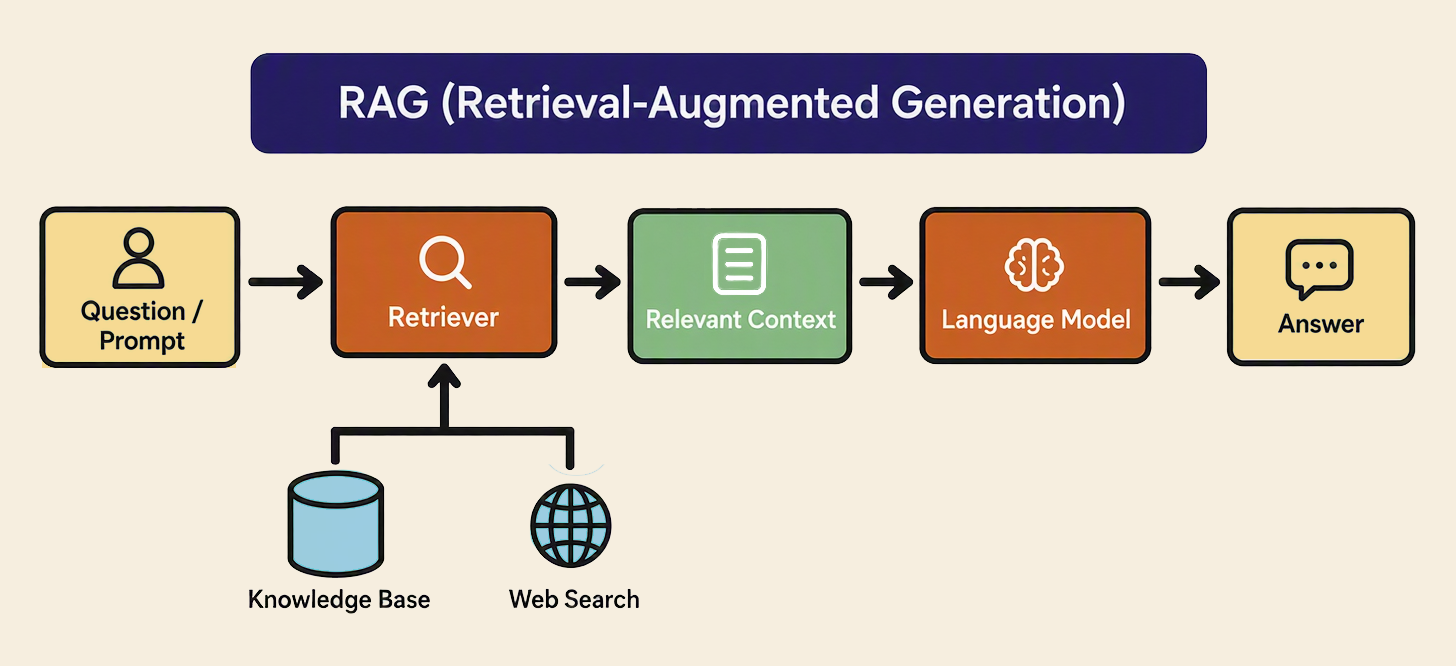
Retrieval-augmented generation (RAG) is a way of finding relevant information and using it to help a model answer. The process has three main steps: the system searches a source or collection of sources for relevant material, adds that material to the model’s context alongside your question, and asks the model to generate an answer using it. The retrieved information provides reference material for that response; it does not retrain the model.
For example, suppose you have a collection of research reports and ask, ‘What was the unemployment rate in South Africa in 2023?’ The system searches the reports for passages or tables that could answer the question. It then supplies the relevant extracts to the model, which uses them to formulate a response. Where the system preserves source details, the answer can also include references so that you can check the figure and its context.
The sources available for retrieval are often organised into a knowledge base: a collection of documents or other information that the system can search. This might contain research papers, institutional reports, or internal guidance. Web search can also form part of a RAG process when the system retrieves information from webpages and supplies it to the model to help answer a question.
RAG can help a model produce answers grounded in specific sources while reducing the amount of material placed in its context. However, it does not guarantee accuracy. The system may retrieve the wrong passage, miss an important qualification, or use an outdated source; the model may also misinterpret the material. For important claims, check the cited source and whether it actually supports the answer.
3. From Answers to Actions
Tools
So far, we have looked at how models generate answers and use information. But many tasks also require actions, such as finding a report online, updating a document, or playing a song. Tools allow an AI application to carry out these operations.
A tool is a function that a model can call to perform a specific operation. For example, a web search tool retrieves information from the internet, while a file tool reads or modifies documents. The model requests an operation, the application executes it, and the result is returned to the model.
Suppose you ask an AI assistant to revise an article and save the changes. It can call a file-reading tool to access the draft, use the model’s language capabilities to revise the text, and then call a file-writing tool to save the revised version. The model produces the edits; the tools provide access to the document and carry out the changes.
Agents and Workflows
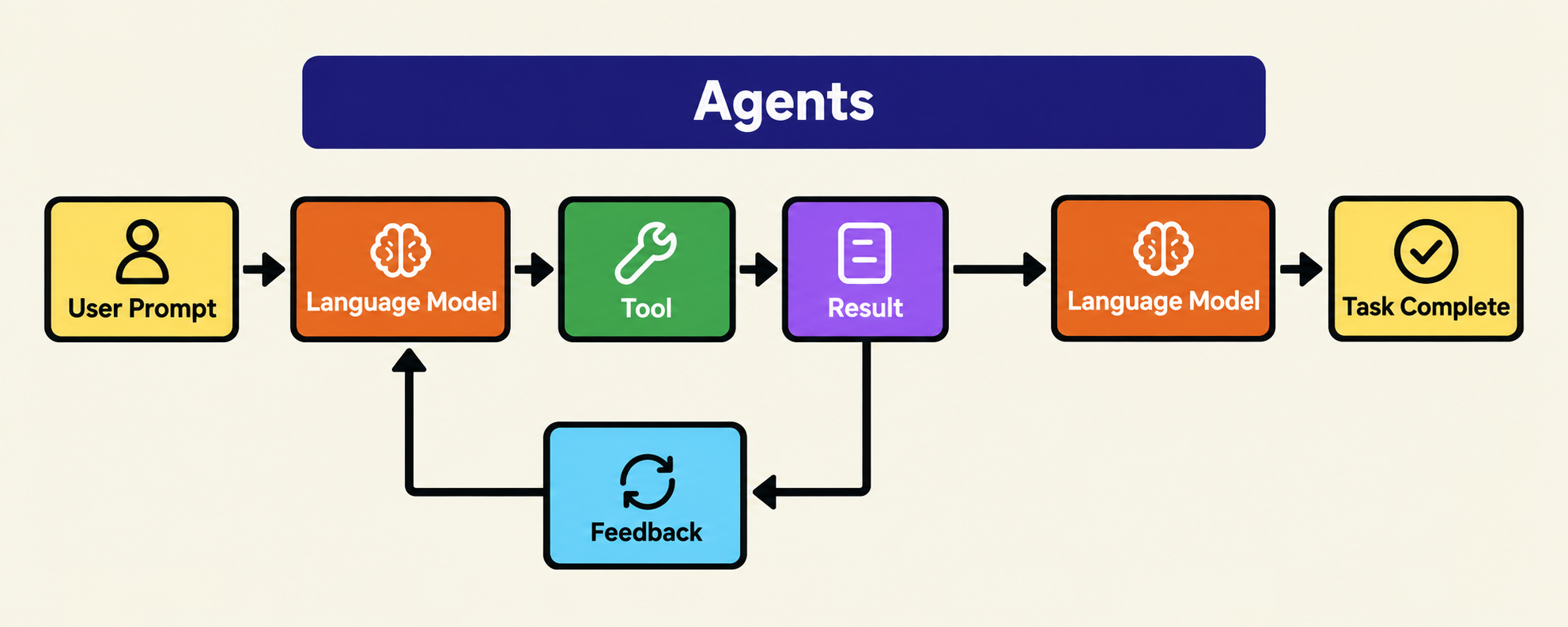
Tools allow an AI application to perform individual operations. Completing a task may also require deciding which operation to perform next, checking its result, and adjusting the approach. An agent is an AI system that uses a model to guide this process towards a goal, without requiring the user to specify every step.
An agent typically works through a repeated cycle: the model chooses an action, a tool carries it out, and the result is returned to the model. The model then uses that feedback to decide what to do next. This might mean continuing with the task, trying a different approach, or asking the user for clarification.
Consider the article-editing example above. You ask the assistant to revise a draft according to an attached style guide and save a new version. An agent can read both documents, identify the changes needed, revise the article, and check the result against the guide. If it finds inconsistent spelling or a missed requirement, it can make another revision before saving.
An agent may stop when it judges the task complete, needs your input, or reaches a limit set by the application. Its output still needs to be checked against the original requirements.
Tasks can also be organised into a workflow: a predefined sequence of steps, such as reading a draft, checking its spelling, and saving a revised version. In a workflow, the main steps are specified in advance; an agent can decide which steps to take as the task develops. The two approaches can be combined. For example, an editing workflow might include an agent that decides how to resolve problems found during review.
 4. Organising and Extending AI Work
Workspace
Once AI can carry out tasks, the next question is how to organise longer projects. If you only occasionally ask AI a question, a chat window is enough. For longer projects, such as writing a book or developing software, repeatedly explaining the files, background, and progress takes time.
Many AI tools provide something called a workspace. You can think of a workspace as a dedicated working area for a project. It may contain files, instructions, previous outputs, and other information related to the project. The application can access relevant materials from the workspace when needed; this does not mean that every file is included in the model’s context at once.
For example, we can create a ‘writing project’ workspace and put articles, images, and reference materials into it. Afterwards, when we ask AI to revise an article, organise materials, or continue writing the next chapter, it can work with these materials without our needing to re-upload all the materials every time.
For a step-by-step guide to organising project folders and working with an AI agent in Visual Studio Code, see our AI workspace setup guide.
Skill
When you ask AI to carry out similar tasks repeatedly, you may find yourself explaining the same requirements each time. A skill is a reusable set of instructions and supporting resources for a particular task. It gives the application a prepared approach to follow, reducing the need to explain the process from scratch.
For example, suppose you regularly edit articles for a publication. You could create an editing skill that instructs the AI to use British English, preserve the author’s argument, check punctuation, and present suggested changes with brief explanations. The skill could also include the publication’s style guide and examples of previous edits. When you use it with a new draft, the application can draw on these instructions and references to review the article.
You can reuse the same skill with different articles and update it when your editorial requirements change. This helps maintain a consistent approach while allowing you to add instructions specific to each draft.
To learn how to find, install, use, and create skills for your own tasks, see How to Install, Use, and Create Skills.
Model Context Protocol
Model Context Protocol (MCP) is a shared standard that helps AI applications connect to other software and use its tools or information. You can think of it as a common connector: when both sides support MCP, they have an agreed way to work together.
For example, suppose you are editing an article and the reports you need are stored in your organisation’s document library. With a suitable MCP connection, your AI application can search that library and retrieve relevant passages to help check the article. This can save you from finding and uploading each report yourself.
A skill and an MCP connection can support different parts of the same task. The skill provides instructions for reviewing the article; the MCP connection gives the application access to the reference materials.
5. Accessing and Running Models
API Key / Auth Token
An application programming interface (API) is a way for one piece of software to ask another to do something or provide information. For example, a writing application can use DeepSeek’s API to send an article to a DeepSeek model and request ‘Summarise this text’. The model generates a summary and sends it back to the writing application, which displays it for you.
To use that API, the application may need an API key or an authentication token: a credential sent with the request to show that it is authorised to access the service. Depending on the service, this credential may also link usage to an account for billing.
Here, ‘token’ refers to an access credential, rather than the units of text described earlier.
Open-Source Models
An open-source model is released with materials and permissions that allow others to use, study, modify, and share it. Researchers and developers can examine how it works and adapt it for their own purposes, building on existing work rather than training a new model from scratch. Examples include publicly released models from China’s DeepSeek and Alibaba’s Qwen team, which users can download, run, and adapt for their own tasks.
For users, one practical benefit is the option to run a model on their own equipment. For example, a research organisation could use a downloaded model on its own server to summarise internal reports, keeping the documents within its own systems. Smaller models may also run on a personal computer, while larger ones require more powerful hardware.
Conclusion
The concepts in this guide describe different parts of working with AI: how a model generates a response, what information is available to it, and how an application uses tools to carry out a task. Understanding how these parts work together helps explain both the capabilities and the limits of the applications you use.
For your next task, consider what information the model needs, which actions the application must perform, and what requirements the result should meet. These questions can help you provide relevant materials, give clearer instructions, and check whether the work has been completed as intended.